PKOS · Face attendance, payroll & HRMS for shift businessesThe intelligence behind every workforce. 

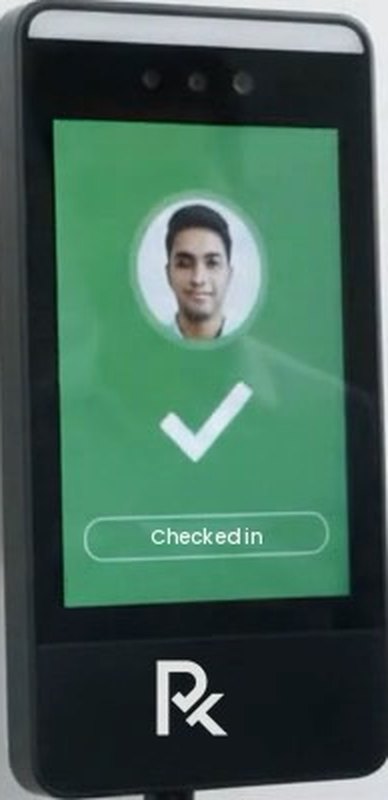
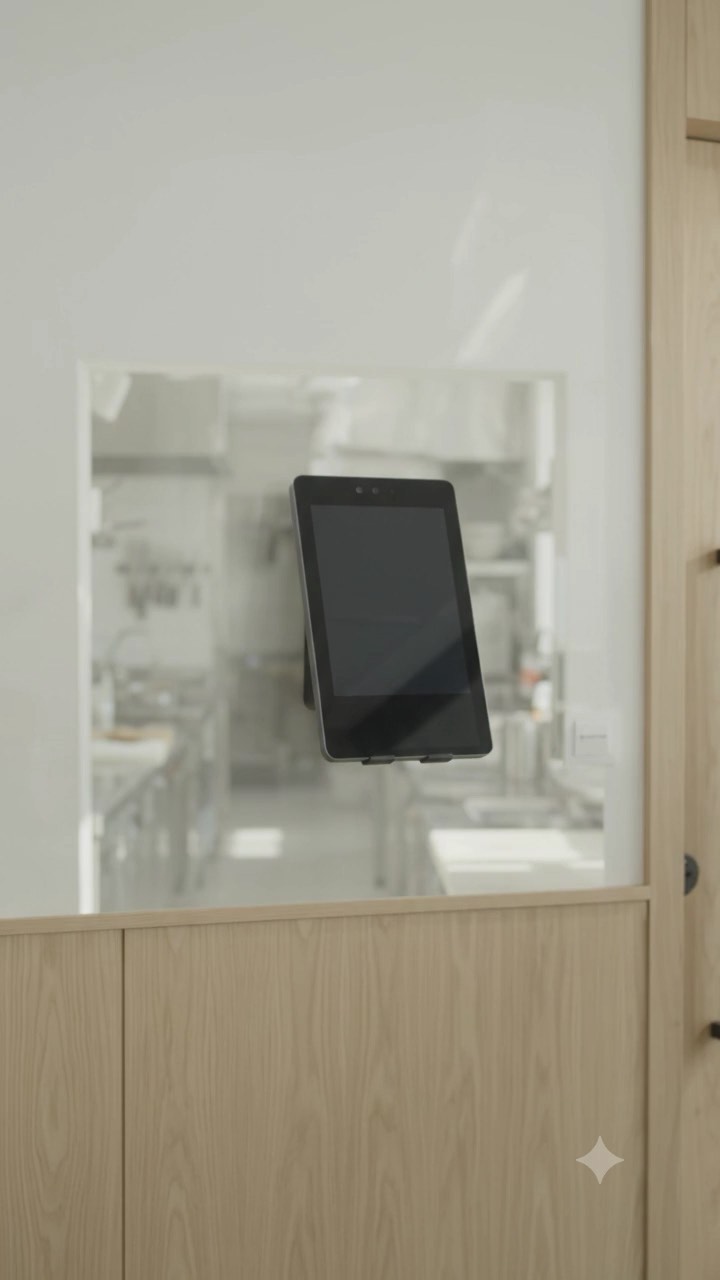
Look at the kiosk — checked in, in under a second. Attendance, roster, leave, payroll, and payslips run from there, for every business that works in shifts.

Free 30-minute demo · Works on any phone · No app store

How face check-in works

Waiting for a face…
  1. 01

    Detect — Spots a face in front of the kiosk

  2. 02

    Align — Lines up the eyes, nose, and mouth

  3. 03

    Convert — Turns the face into 128 numbers — no photo saved

  4. 04

    Match — Finds the right employee in under a second

  5. 05

    Record — Marks attendance with the time and place

Meet PKOS

The HRMS your floor actually talks to.

PKOS (People Key Operating System) is an HRMS for shift businesses in India. It runs attendance, rosters, payroll with PF, ESI and PT, and payslips — now with HR chat, Face ID sign-in, and a payroll check that catches money mistakes before you pay.

  • ✓ No app store
  • ✓ PF, ESI, PT built in
  • ✓ Made in India

See PKOS work

Five new things, playing live.

yourcompany.fitbiz.app/app/chat

HR chat

Ask HR in the app — text or voice.

Staff message HR about leave, salary, or attendance. Voice notes for anyone who prefers to speak. HR answers from one inbox, with unread counts in the menu.

  • Text and voice notes, up to 2 minutes
  • Topic chips: Leave, Salary, Attendance, Documents
  • "Can't sign in?" — message HR from the login page
  • Each business's chats stay with its own HR
HR
HR desk · Main branch● Usually replies within an hour
Salary
Hi, my payslip shows 2 days less. I worked on the festival holiday.
▶
0:14
Checked — the holiday was marked absent by mistake. Fixed as holiday worked, double pay. Your payslip is updated.
Message HR

Works on any screen

Wall kiosk, tablet, phone, or laptop.

Go fully touchless with the wall-mounted PKOS device — or turn any screen with a camera into a check-in point. Same app, same register.

PKOS

Workforce Operating System

6:02 pm

Fri 16 Oct

Walk up to check in

Ready · 8 enrolled faces

Hold still…

NS

Neha Sharma

Checked in · 6:02 pm · Front desk

Wall-mounted kiosk · walk up and look — check-in happens on its own

For every team that works shifts

One HRMS. Every kind of floor.

Gyms, restaurants, clinics, salons, schools, stores, hotels, offices, and factories — if your people clock in, take breaks, and get paid, PKOS fits.

Gyms · studios · salons · stores

Walk in, look, done. No card, no register.

Gyms & fitness

Trainers · Front desk · Housekeeping

The everyday problem

5 am openings, split shifts, and incentive on every sale.

How PKOS handles it

  • Face check-in at the front desk
  • Split-shift roster with weekly offs
  • Sales targets flow into incentive

Why PKOS is different

Five things no other HRMS puts together.

Most HR software was built for desks. PKOS was built for the floor — and it shows in every one of these.

Roster-aware

Judged against each person's own shift.

Not a fixed 9-to-6. Late, half day, and holiday work are measured against the roster that person actually had.

Paperless, OTP-signed

Letters signed without paper.

Offer, appointment, warning, and relieving letters go to the employee's email and are signed with an OTP — with a full audit trail.

No app store

Installs from a link in seconds.

A light web app staff add to their home screen. No Play Store, no App Store, no update prompts — always the latest version.

Your files, your Drive

Records live in your Google Drive.

ID proofs, certificates, and signed letters are filed to the business's own Drive. Full access, no lock-in.

New in PKOS

Just shipped. Already at work.

HR chat with voice notes, a payroll check that catches money mistakes, Face ID sign-in, and a new staff app — every card here is live in PKOS today.

HR chat · New

HR chat — text and voice

Staff ask HR about leave, salary, or attendance inside the app, by text or a voice note. HR answers every conversation from one inbox. Can't sign in? Message HR straight from the login page and HR calls back.

HR desk · Main branchReplies within an hour
Can I take Saturday off? My sister’s wedding.
▶
0:09
Approved — enjoy the wedding! Your roster for Saturday is updated.
New

Payroll error check

Paid twice, more paid days than the month has, wrong joining dates — caught line by line, and fixed on screen before payslips go out.

Payroll

New

Request check-in

Missed the front desk? Staff send a check-in request with their location, and HR approves it in one tap.

Attendance

New

Face ID & fingerprint sign-in

Passkeys sign staff in with the face or fingerprint already on their phone — no waiting for an email code.

Sign-in

New

Roster import

The whole team's week from one Excel sheet — split shifts and weekly offs included, every line checked first.

Rosters

Payslips, statement & bank advice from your sheetNew

Upload Employee ID, paid days, and gross. PF, ESI, PT, and weekly offs are worked out; publish payslips, then download the salary statement and bank advice. Saved months can be opened and fixed any time.

Payroll

A new staff appNew

Home with one-tap actions, Chat, Pay, and a Me tab that shows one next step, plain statuses, and a timeline for every request to HR.

Staff app

A front desk that stays at the branchNew

Any tablet becomes the branch check-in point, paired by QR, approved by HR, and locked to the branch location — with live status of who is on the floor.

Front desk

Many businesses, one owner consoleNew

Run every business from one place with Master Admin, Admin, and HR roles. Support opens a business only with a reason, view-only by default, and every visit is shown to that business.

Control

Live floor dashboard

Who is on shift right now — in every department.

Open PKOS in the morning and see the whole business at a glance: every department, every shift, every branch, consolidated and live.

Live · All branches

updated 10:42 am

On duty

41 / 58

On break

5

Late

3

Not in yet

5

On leave

4

Morning

Now

6 am – 2 pm

32 of 44 in

General

9 am – 6 pm

9 of 14 in

Evening

2 pm – 10 pm

0 of 22 in

By department · on shift now

Tap a status to highlight it, or a department for its breakdown.

Just nowRavi K checked in · Operations · Face
  • 1

    Department by department

    Every team's on-duty, break, late, and absent count in one row.

  • 2

    Shift by shift

    Morning, general, and evening — rostered against who actually came in.

  • 3

    Every branch, consolidated

    One owner's view across locations, or drill into a single branch.

  • 4

    Live, not end of day

    Each check-in updates the board the second the face matches.

Staff see themselves, live

HR sees the floor. Every employee sees their own record.

Late or on time, pay days, and money earned so far this month — all live in the staff app. Transparency does what reminders never could.

✉

Friday, 16 October

Hi, Neha

Checked in · 8:58 amOn time

Earned this month so far

₹9,846

● growing while you're on shift

On-time streak

12 days

Pay days

19 / 31

Late this month

1 of 3

On time today — keep it that way.

  • 1

    Live, not at month end

    Every check-in, late mark, and rupee earned shows up the moment it happens.

  • 2

    Your rules, not ours

    Grace period, late marks, deductions — set to match your policy, applied the same way to everyone. Staff see exactly where they stand.

  • 3

    Behaviour that changes

    When people can see their own record, they fix it themselves — no reminders needed.

Late rules · set by HR

N

Neha · checked in 8:58 am

1 of 3 lates this month

On time
  • Grace period

    10 min

  • Late after grace

    Marked late

  • 3 lates in a month

    ½ day deducted

  • More than 2 hours late

    Half day

  • Email on every late check-in

    HR + employee

Your rules, not ours — tap EDIT and try it.

Discipline, without a culture of fear

Every employee accountable. Every manager responsible. Every branch under control.

Clear rules, records everyone trusts, fair consequences, and recognition for doing it right. That is what turns attendance software into a disciplined floor.

The accountability loop

Clear rules + trusted records + fair consequences + recognition = accountability.

Clear expectations

Each person sees their shift, weekly off, and the grace period and late rules HR sets — in their own app, before the day starts.

  • Roster in the staff app
  • Late rules visible
  • Weekly off & holidays

Owner's morning view

Sample figures

94%

On time this week

8

Late arrivals

5

Pending approvals

4

Missed check-outs

Needs your attention

  • Repeated lateness

    3 staff crossed your monthly late limit

  • Missed check-outs

    4 requests waiting for HR approval

  • Pending approvals

    Leave and corrections older than 2 days

  • Incomplete records

    2 new joiners without verified documents

Your first 30 days

A disciplined floor in four weeks.

Enter shifts, weekly offs, grace period, late rules, leave policy, and who approves what.

Measure against week one — punctuality, missed records, shift coverage, and open requests. The software makes it visible; your team makes it stick.

What one check-in captures

One look at the kiosk. Ten things handled.

Every check-in is matched, stamped, located, and checked against the roster — then attendance, headcount, pay days, and payroll update before the person reaches the floor.

Captured at the kiosk

  • Face matched

    Neha Sharma · in 0.8 seconds

  • Time stamped

    6:02 am, from the kiosk clock

  • Location confirmed

    Inside the branch radius · 38 m

  • Shift checked

    Rostered 6 am – 2 pm · on time

  • Day type read

    Working day, weekly off, or holiday

PKOS face kiosk showing a staff member checked in

Checked in

One look. Ten records updated.

Updated instantly

  • Register marked

    P for 16 Oct, live for HR

  • Headcount updated

    On the floor now · 8

  • Streak extended

    On time, 12 days in a row

  • Pay days counted

    19 of 31 for October

  • Payroll kept current

    PF, ESI, and PT ready for the run

End to end

From the first sign-up to the last payslip.

Nine steps every business repeats. One system holds all of them, so nothing is re-typed and nothing is lost between tools.

  1. 01

    Sign up

    Staff self-register. HR approves the new sign-up.

  2. 02

    Verify

    Appointment letter signed by OTP, documents filed to your Drive, home address verified on location.

  3. 03

    Roster

    Weekly template once. Shifts, split days, and weekly off land on their own.

  4. 04

    Check in

    Face at the kiosk, geo-fenced in the app, or a field visit HR approves.

  5. 05

    Breaks & leave

    Break in, break out, leave, comp-off, and missed punches — all requested in-app.

  6. 06

    Targets

    Sales approved, targets tracked, incentive ready for payroll.

  7. 07

    Payroll

    Attendance becomes salary. PF, ESI, PT, double pay, and recoveries in one run.

  8. 08

    Payslip

    Published to every phone the moment the month is locked.

  9. 09

    Exit

    Full & final in the same run — relieving and settlement letters signed by OTP.

No app store needed

Installed from a link. Updated by itself.

PKOS is a light web app. Staff open a link, add it to their home screen, and it behaves like any app — fast, full screen, and always on the latest version.

Store appPKOS
Where you get itPlay Store / App StoreA link — WhatsApp it
Time to installMinutes, plus sign-inA few seconds
UpdatesManual, from the storeAutomatic, every open
Phone storageHeavy downloadVery light
Works onPhonesPhone, tablet, laptop, desktop
AndroidiPhoneTabletLaptopDesktop

Runs over HTTPS in the device's own browser — nothing to side-load, and only camera or location access when a check-in needs it. HR works from the same app on a laptop or desktop.

🔒 fitbiz.app/pkos

PKOS Staff

Attendance, leave, and payslips

Add PKOS to Home screen

fitbiz.app · installs in seconds

Install

10:41

PKOS

Good morning

Neha Sharma

Checked in · 9:02 am

On time streak

12 days

Pay days

19 / 31

Leave left

6 days

Payslip

Sept ✓

This week

MPTPWLTPFPSWS—

Today

  • Checked in · face9:02 am
  • Break1:00 – 1:30 pm
Check out
  1. 1Open the link
  2. 2Tap Add to Home screen
  3. 3PKOS is on the home screen
  4. 4Open it — like any app

Employee database & verification

Every employee verified. Every file yours.

One record per person — profile, statutory numbers, documents, and a home address checked on location. The files sit in your own Google Drive, not locked inside an app.

NS

Neha Sharma

Front desk · Main branch · Joined 2 Jun 2026

✓ Verified
  1. Profile created

    Role, department, joining date, bank, PF UAN, and ESI IP number.

  2. Documents filed

    ID proof, address proof, and certificates saved to your Google Drive.

  3. Address verified

    Location captured at the declared home address and matched.

  4. Verified

    A verified badge on the record — before the first payroll.

Your Google Drive

Full access · yours

PKOS / Employees / Neha Sharma

  • PDFID-proof.pdf
  • PDFPAN.pdf
  • PDFAddress-proof.pdf
  • PDFAppointment-letter.pdf
  • PDFCertificates.pdf

Uploaded from the staff app, filed by person automatically. Share, audit, or export them the way you already use Drive.

Address verification

Declared: 14, 3rd Cross, HSR Layout

Location captured at the address · matched within 25 m

Address verified · 18 Jun, 7:40 pm

Paperless documents & e-sign

Every HR letter — generated, sent, and signed without paper.

Ready-made templates you can edit, filled from each employee's record. Staff sign from their email with an OTP, and PKOS keeps the proof.

Templates

Editable
  • Offer letter
  • Appointment letter
  • Warning letter
  • Relieving letter
  • Full & final settlement
  • Experience letter
  • Form 11 (EPF)
  • TDS · Form 16

Change the wording, add your logo and signatory, or create your own — every letter after that uses it.

Pick a template — it fills itself from the employee record.

YCYour Company Pvt Ltd
16 Oct 2026

Appointment letter

  • Employee name{{ Employee name }}Neha Sharma
  • Designation{{ Designation }}Front desk executive
  • Joining date{{ Joining date }}2 June 2026
  • Annual CTC{{ Annual CTC }}₹2,40,000

✓ Ready to send · filled from Neha's record

See it on your own appointment letter — with your logo and wording.

Email alerts

Every event, in the right inbox.

Late check-ins, signed letters, approvals, and payslips — HR and the employee hear about it the moment it happens.

  • Late check-in

    Ravi K checked in at 9:18 am — 18 min late

  • Offer accepted

    Neha Sharma signed the appointment letter

  • Leave approved

    Asha M · 21–22 Oct · approved by HR

  • Payslip published

    October payslips are live for 58 staff

Location-based check-in

Check in where the work is.

Kiosk, phone, or field — PKOS knows the difference, and so does your payroll.

  • 1

    Geo-fenced app check-in

    Each branch has a radius. Check-in from the staff app works inside it — no proxy punches from home.

  • 2

    Field and home visits

    Working outside the fence? Raise a visit check-in. The location is captured and HR approves each one.

  • 3

    Face at the front desk

    The kiosk tablet still does contactless face check-in in under a second. Every method lands in one register.

Branch radius · 100 mYou

You · 161 m from branch

Outside fence

Drag the blue dot or tap the map, then check in.

Staff safety

Everyone accounted for. Every shift.

Safety starts with knowing who is in the building, who is out in the field, and who is still working late. PKOS keeps that record live — not in a register in a drawer.

On the floor now

3

Main branch · 10:18 pm

  • Vikram · SupervisorSince 5:58 pm
  • Priya · Front deskSince 2:00 pm
  • Imran · FloorSince 4:30 pm

Checked out tonight

Meera · 9:12 pmAnanya · 9:40 pmSiva · 10:05 pm

Know who is inside, right now

A live on-duty count for every branch — the list you need in an emergency or evacuation.

Late and night shifts, on record

Every check-out is recorded. HR sees who is still on the floor after hours — the record night-shift safety needs.

Field staff, located

Home visits and field work capture location at check-in, so someone always knows where a colleague is.

Breaks you can see

Who is on break, for how long, and still on the premises — fair to staff, clear for managers.

The right person, every time

Face match means nobody checks in for someone else — so the headcount you rely on is real.

A trail, not a rumour

Every change to attendance and pay is logged with who made it and when.

Payslips

A payslip people actually understand.

Attendance, incentive, double pay, and statutory deductions — calculated once, explained line by line, and in the staff app the same day.

  • Published to every phone the moment HR locks the month
  • PF, ESI, and professional tax explained in plain words
  • Lost days listed with the reason for each one
  • A wage slip for every worker — as the Code on Wages asks
  • Past payslips kept in the app, ready for a loan or visa

Payslip · September 2026

Ananya Rao

Senior Associate · Pay days 27 of 30

Published

Earnings

  • Basic & DA₹14,000
  • Incentive₹2,698
  • Double pay · 2 holidays₹1,000

Deductions

  • Provident fund · 12%− ₹1,680
  • ESI · 0.75%− ₹133
  • Professional tax · KA₹0

Net pay

₹15,885

Gross ₹17,698 − deductions ₹1,813

Try it on Ananya's month

Unpaid days

3

Holidays worked

2

Real screens

This is what your team sees.

Not mockups. PKOS running a live business today — the staff app in every pocket, and the HR console that turns the month into payslips.

For every employee

The staff app

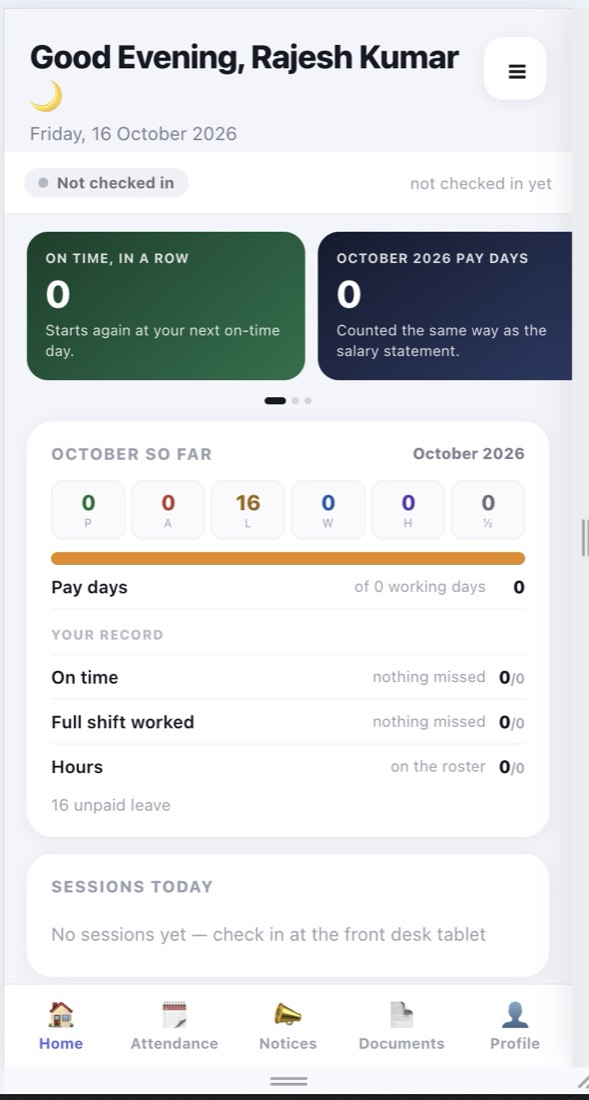
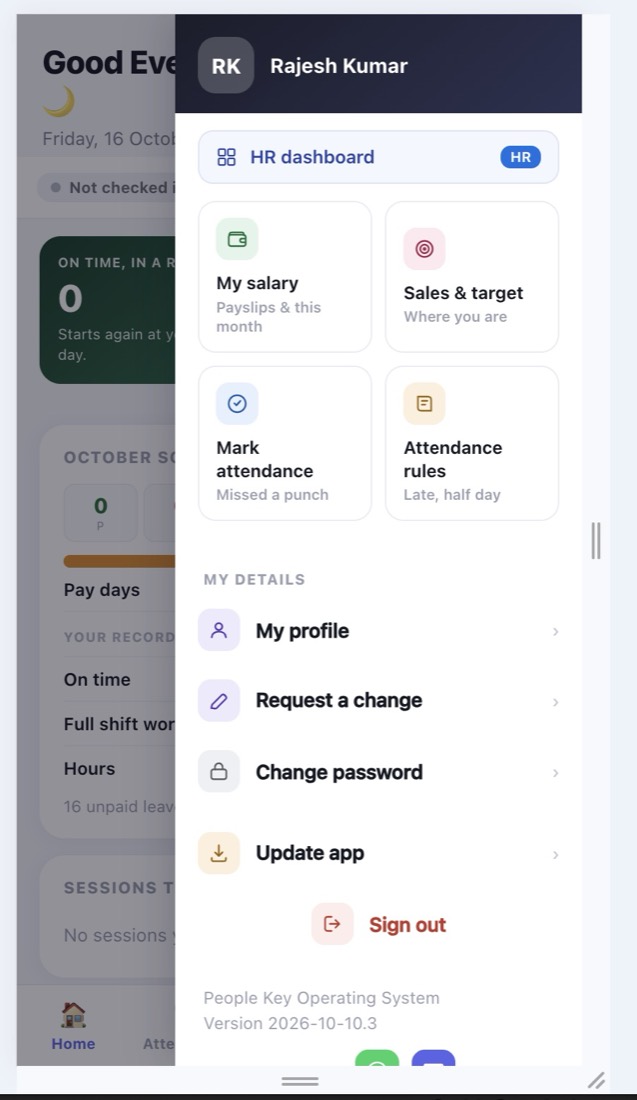
Home

Home

Check-in status, on-time streak, pay days so far, and today's sessions.

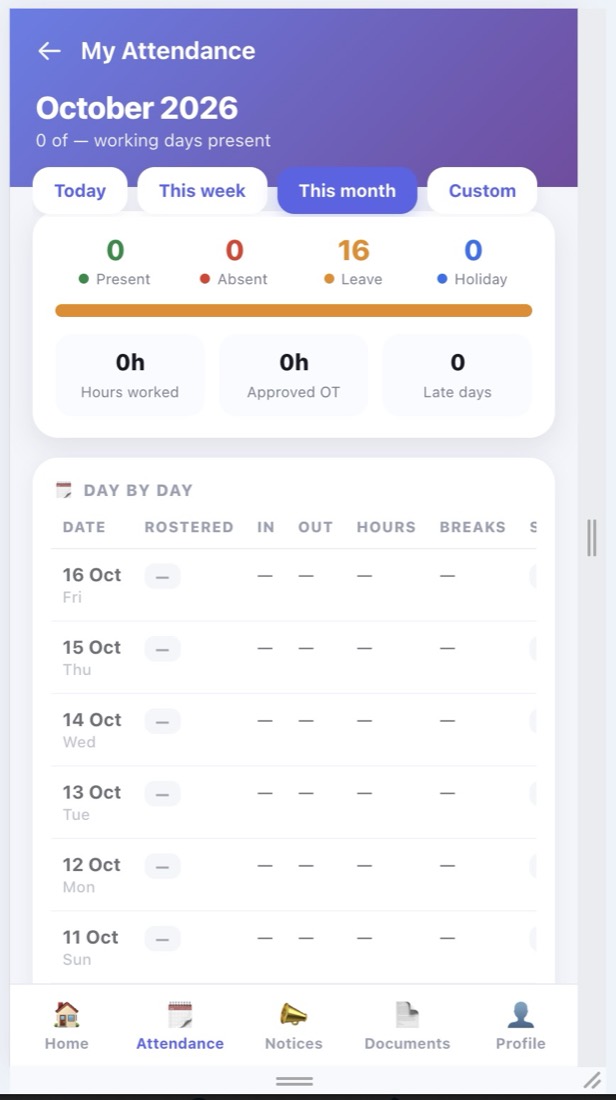
My attendance

My attendance

Today, week, month, or custom — present, absent, leave, hours, OT, late days, day by day.

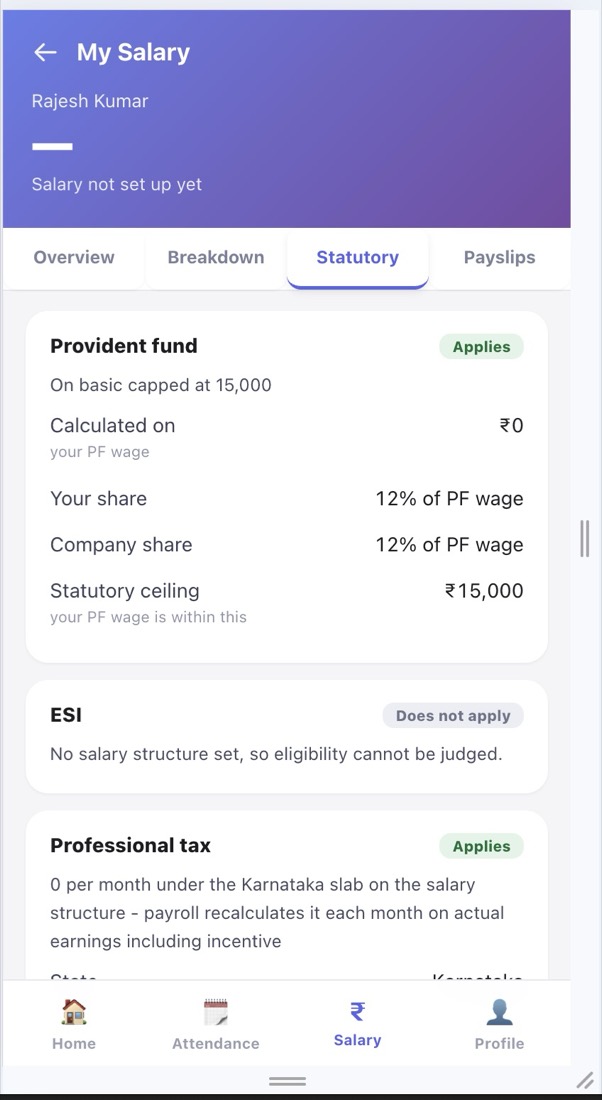
My salary

My salary

Overview, breakdown, statutory, and payslips — PF, ESI, and PT explained in plain words.

Everything else

Everything else

Sales & target, missed-punch requests, attendance rules, profile changes, and password.

For HR and owners

The HR console

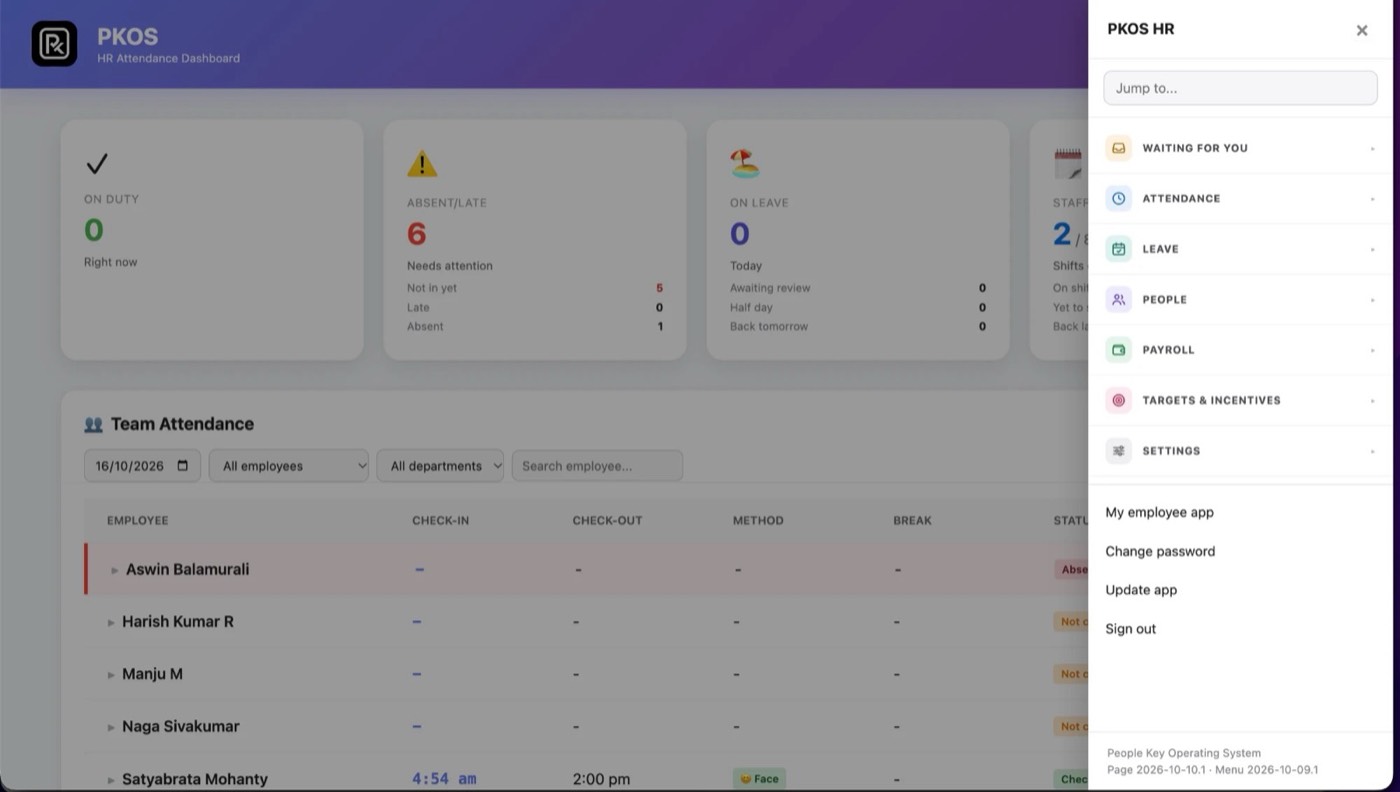
yourcompany.fitbiz.app/admin/dashboard
HR attendance dashboard

HR attendance dashboard

One pulse for the floor, the moment you open it.

  • On duty, absent or late, on leave, and shift coverage
  • Team attendance by date, department, and person
  • Check-in method recorded — face, app, or manual
  • Every HR module one tap away in the side menu

Why now

Pay mistakes are the norm. They don't have to be.

India's workforce is growing on shift floors, the law now asks for a wage slip for every worker, and most payroll errors start with manual steps.

21 Nov 2025

Four labour codes in force

Appointment letters and wage slips for every worker. Women may work night shifts with their consent and the employer's safety arrangements.

Read the summary

May 2027

DPDP core duties apply

Notice, security safeguards, and breach reporting for personal data — including what your attendance system keeps.

Read the summary

Side by side

What changes when you switch.

Against the way most businesses run today — and against a typical HRMS.

CapabilityRegisters + WhatsAppTypical HRMSPKOS
Contactless face check-in, no photo storedVaries
Geo-fenced app check-in + approved field visitsVaries
Attendance judged against each person's rosterOften fixed shifts
Holiday worked: comp-off or double pay, cost shownManualRare
Every lost day explained to the employeePartial
PF, ESI, and PT inside the payroll runManual
Full & final in the same monthly runManualOften separate
Live on-premises headcount for safetyVaries
Plain-language staff app with payslips
Pay for the staff you have — no 50-seat packs—50-seat packs
Employee documents kept in your own Google DrivePaper filesVendor's cloud
Home address verified by geolocationRare
Letters e-signed by OTP — no paper, full audit trailPrinted & signedOften an add-on
Installs without an app store, updates itselfStore download
Front desk tablet that works only at the branchVaries
Face ID consent recorded, with a downloadable recordRare
Payroll run straight from your Excel sheetManualRare
Bank salary advice with masked account numbersManualOften an add-on

“Typical HRMS” describes common setups; features vary by vendor and plan.

Every HRMS feature · 60 and counting

Everything you do for your staff. Already inside.

One system from hire to exit — nothing to stitch together. Here is the full list.

Everything here is in every plan, exceptPro = Professional and EnterpriseWhich plan fits me? ↓

Time & attendance

  • Face check-in kiosk
  • Geo-fenced app check-in
  • Field & home visitsPro
  • Break in / break out
  • Missed-punch requests
  • Overtime approvalPro
  • Front desk tablet, locked to the branch
  • Live status at the door
  • Request check-in with HR approval

Payroll & statutory

  • One-click monthly run
  • PF, ESI & professional tax
  • Double pay or day off
  • Hold & recoveryPro
  • Full & final settlementPro
  • Published payslips
  • Payroll from your Excel sheet
  • Bank advice & bulk updates
  • Payroll error check before payday

Core HR

  • Employee database
  • Documents in your Google DrivePro
  • Address verification by locationPro
  • Directory & departments
  • Onboarding & offboarding
  • Profile change requests
  • Branch & franchise profiles
  • Face ID consent records

Roster & leave

  • Weekly roster templates
  • Split shifts & weekly offs
  • Roster change requestsPro
  • Paid leave & half day
  • Comp-off with expiryPro
  • Holiday calendar
  • Roster import from Excel

Sales & engagement

  • Targets per personPro
  • Sales approvalsPro
  • Incentive in payrollPro
  • On-time streaks
  • Noticeboard
  • Staff self-service app
  • HR chat — text & voice notes

Documents & e-sign

  • Editable letter templatesPro
  • Offer & appointment lettersPro
  • Warning & relieving lettersPro
  • Full & final settlement letterPro
  • Form 11 & TDS / Form 16Pro
  • OTP e-signature with audit trailPro

Access & alerts

  • Installable app — no store
  • Phone, tablet, laptop, desktop
  • Always the latest version
  • Email alert on late check-in
  • Email on every approval
  • HR and employee roles
  • Face ID & fingerprint sign-in (passkeys)
  • Many businesses, one owner console

Control & reports

  • HR inbox for every request
  • Live attendance dashboard
  • Attendance register
  • Monthly summary & leave register
  • Salary statement · Excel export
  • Audit log of every change

Plans

Which plan fits me?

Three quick answers — we'll show the plan that fits your business and everything it includes.

1How big is your team?

2How many branches?

3Do you also need…

Fits you

Starter

Run one branch, right.

Single-location gyms, cafés, clinics, salons, and stores moving off paper registers.

Name, mobile, and email — we send a 6-digit code. Takes under a minute.

Coming next · 2026 roadmap

Where HR software is going. PKOS is building it.

AI that answers in plain words, WhatsApp-first staff, earned wages, and your team's own language — the trends reshaping HR, on the way to PKOS.

AI · Coming next

PKOS Copilot

Ask in plain words — "who is late today?", "overtime this week?", "draft a warning letter" — and get the answer or the draft in seconds.

Who is late today?

3 late so far — Ravi (Operations, 12 min), Asha (Sales, 8 min), Imran (Housekeeping, 21 min). Imran's 3rd this week.

Draft a warning letter for Imran.

Draft ready from your Warning template — 3 late marks attached. Send for OTP signature?

Coming next

WhatsApp alerts & payslips

Late check-ins, approvals, and monthly payslips delivered where your staff already are.

Messaging

Coming next

Salary advance

Staff request part of what they have already earned this month; HR approves and it settles in payroll.

Earned wages

Coming next

Hindi, Kannada & Tamil

The staff app in the language your team reads best — payslips and rules included.

Languages

Coming next

Liveness check

Blocks a printed photo or a phone screen held up to the kiosk, so only a real face checks in.

Security

Coming next

Shift swap

Two staff agree a swap in the app; the manager approves with one tap and the roster updates itself.

Rosters

Coming next

Smart roster suggestions

Next week's roster drafted from footfall, leave, and who is on overtime — you review and publish.

AI

Coming next

Attrition early warning

Spots patterns like rising late marks and unplanned leave, so you talk to a good employee before they quit.

Insights

Roadmap items are in development and not yet available. Want one sooner? Tell us in your demo — customer requests set the order.

Questions

What owners ask before they switch.

  • PKOS (People Key Operating System) is an HRMS for businesses that work in shifts. Staff check in by face on a wall kiosk or any tablet, phone, or laptop, or by GPS geo-fence on their own phone. Attendance then flows into rosters, leave, payroll with PF, ESI and professional tax, payslips, and OTP e-signed HR letters — in one system.

  • Yes. The PKOS face kiosk is touchless, so there is no shared sensor to wipe or wear out, and any tablet or phone with a camera can act as a check-in point. Attendance goes straight into payroll instead of being exported from a machine.

  • Yes — PKOS runs on your rules, not ours. HR sets the grace period, late and half-day rules, leave types and comp-off expiry, double pay or comp-off for holiday work, weekly roster templates, each branch's geo-fence radius, and the wording of every letter. PKOS applies them the same way to everyone, and staff can see the rules that apply to them.

Why owners trust PKOS with their people.

Prefer a call? +91 9620000162
  • No face photos stored

    Only a 128-number descriptor is kept for matching.

  • Your files, your Drive

    Employee documents live in your own Google Drive.

  • Every change logged

    Who changed attendance or pay, and when.

  • OTP-signed letters

    Verified email, time, and device on every signature.

  • Secure by default

    Runs over HTTPS; HR access only for the people you choose.

  • Made in India

    Built for Indian payroll, PF, ESI, PT, and labour rules.

The Intelligence Behind Every Workforce

PKOS is the People Key Operating System— the HRMS behind every workforce.

Book a demo

See your workforce operate in one place.

A 30-minute walkthrough of face login, attendance, roster, leave, and payroll — on your own shifts and rules.

WhatsApp us instead